- A Linux machine (any version is OK, BackTrack is good, I used Ubuntu 10.04)
- A Windows attacker (Windows 7, 8, or 10 32-bit work. If you use the Windows server 2008 machine I passed out, look in the Documents folder to find a v. 3.6 of the attack tool which works)
Start the Linux machine and log in. Open a Terminal window. Ping ubuntu.com and make sure you are getting replies. If you are not, you need to fix your networking before you can proceed.
In the Terminal window, execute this command:
service apache2 start
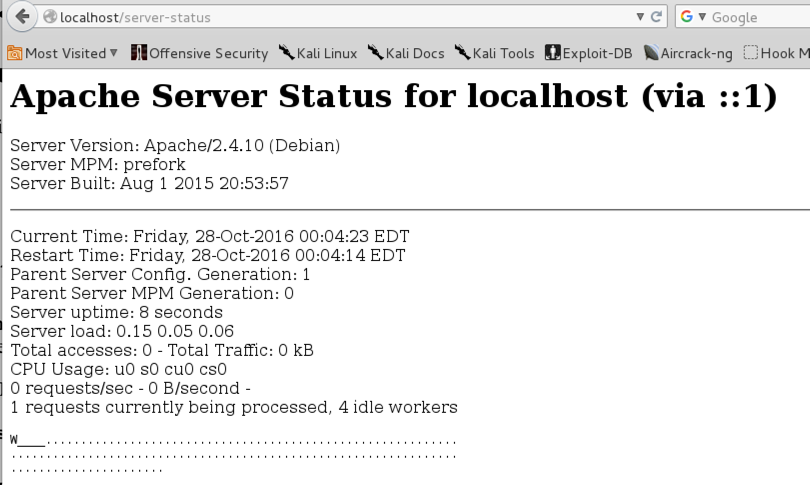
You should see only one letter in the grid, indicating that only one client is being served at the moment, as shown below on this page.
http://samsclass.info/123/proj14/HttpDosTool4.0.zip
If you are using Windows 2008 Server, you need to use this old version:
http://samsclass.info/123/proj14/HttpDosTool3.6.zip
The downloaded file is named "HttpDosTool4.0.zip". Unzip it.
If you are using HttpDosTool4.0, A window named "HttpDosTool4.0" appears. Double-click the SwitchBlade4.0 folder to open it. Double-click the gui.exe file.
If you are using HttpDosTool3.6, A window named "HttpDosTool3.6" appears. Double-click the HttpDosTool folder to open it. Double-click the gui.exe file.
The "HTTP attack" window opens, as shown below.
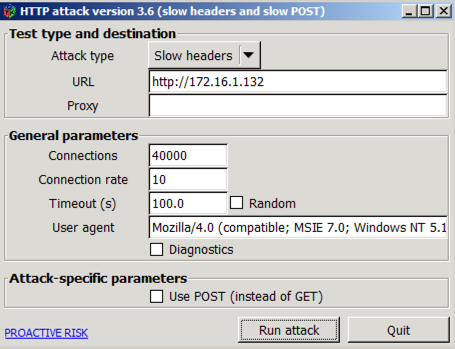
In the URL box, enter http:// followed by the IP address of your Linux Apache server.
Start with these parameters, which are sufficient to bring Apache to a total stop:
Click the "Run attack" button.
Refresh the page every few seconds.
You should see the grid gradually fill with letters, indicating that all possible connections (150) are in use, as shown below on this page.
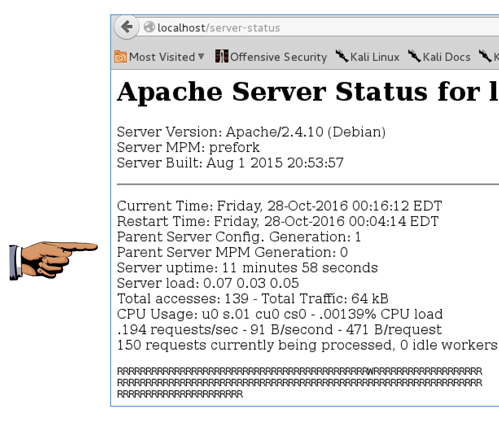
Make sure you can see the status grid filled with letters, as shown in the image above on this page.
YOU MUST SUBMIT A FULL-DESKTOP IMAGE FOR FULL CREDIT
Save a screen image with the filename Proj 16 from Your Name.
Email the image to cnit.123@gmail.com with a Subject line of Proj 16 from Your Name.
http://blog.spiderlabs.com/modsecurity/page/2/
Last modified: 10-27-16